

Memory in AI: A New Frontier
The rapid evolution of artificial intelligence has led to a surge in applications that promise to streamline workflows and enhance productivity. One critical area that has recently gained attention is the ability for AI tools to remember and organize information across sessions. Unlike traditional AI interfaces, which often start from scratch with each interaction, memory-enabled AI tools could fundamentally change how users interact with technology, making it more intuitive and personalized.
This shift matters because it addresses a significant limitation: the inability of AI to retain context over time. As AI becomes more embedded in professional and personal workflows, the demand for tools that can remember past interactions and build on them is increasing. This is where the concept of memory in AI is not just a novelty but a necessity.
The Pain Point of Context Loss
Current AI tools, including popular chatbots and virtual assistants, typically lack the ability to maintain a continuous thread of conversation across sessions. This limitation forces users to repeatedly input the same information, leading to inefficiencies and frustration. In complex workflows, such as project management or customer support, this lack of continuity can hinder productivity and decision-making.
Many teams have coped by using external note-taking apps or manual documentation to bridge these gaps. However, these solutions are often cumbersome and prone to error, highlighting a pressing need for AI that can independently manage and recall context, thereby reducing repetitive tasks and improving user experience.
Innovative Solutions by Builders
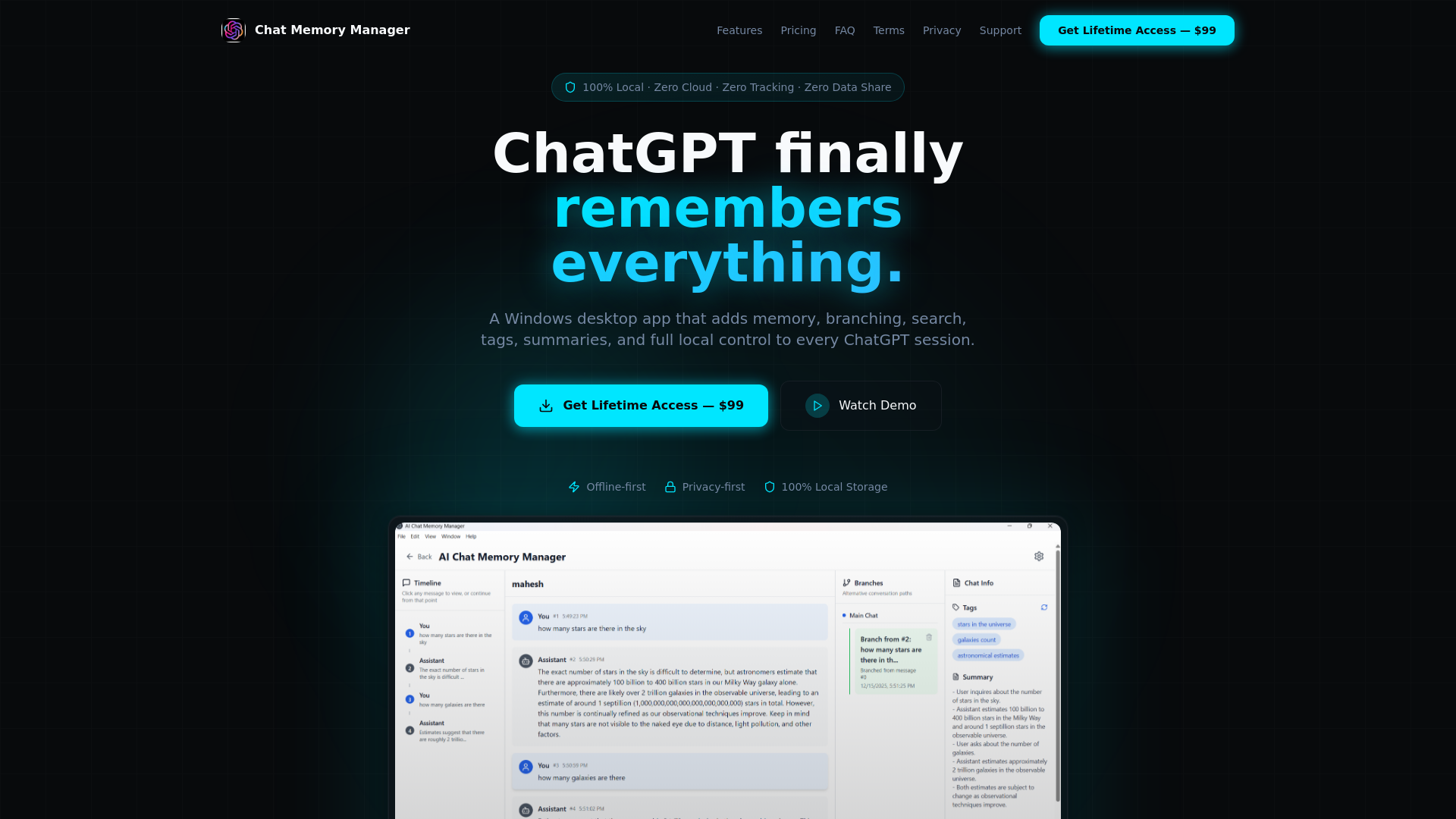
In response to these challenges, innovative tools are emerging that aim to integrate memory capabilities within AI interfaces. Chat Memory Manager - ChatGPT Finally Remembers Everything exemplifies this trend by offering a Windows desktop app that enhances ChatGPT sessions with memory, branching, search, tags, and summaries.
This tool is designed for both individual users and teams, providing full local control over ChatGPT sessions. It introduces a structured approach to managing AI interactions, enabling users to focus on higher-value tasks while the app handles the organization and recall of information. This represents a significant step forward in making AI more user-centric and effective in daily workflows.
Chat Memory Manager - ChatGPT Finally Remembers Everything in Practice
For individuals, this tool can transform the way they interact with AI by providing seamless continuity across sessions. Imagine a researcher who uses ChatGPT for data analysis. With this app, they can save session states, tag important discussions, and easily branch off into new queries without losing context. This not only saves time but also enhances the depth and quality of analysis.
Teams, particularly in professional settings, can leverage this memory management to centralize project discussions and decisions. A marketing team, for example, could use the tool to track brainstorming sessions and campaign strategies, ensuring that all members have access to the same contextual information. This ability to archive and retrieve past interactions paves the way for more informed and agile decision-making processes.
Distinctive Features and Benefits
What sets Chat Memory Manager apart is its focus on providing a clear, structured user experience that caters to both novice and advanced users. Its paid model suggests a commitment to high-quality, ongoing updates and support, which is crucial for maintaining reliability in professional environments.
Unlike some competitors, which may offer similar functionalities in a more fragmented manner, this app integrates all features into a cohesive platform. This holistic approach not only simplifies the user experience but also enhances the overall value proposition by reducing the need for additional tools or plugins.
Ideal Users and Use Cases
Chat Memory Manager is particularly relevant for users who rely heavily on AI for complex, ongoing tasks. Researchers, analysts, and project managers who need to maintain a continuous narrative across multiple sessions will find this tool invaluable. Additionally, teams that require collaborative access to organized AI interactions can greatly benefit from its features.
For those who are building workflows around AI, this tool offers a practical solution to the common problem of context loss, making it a worthwhile consideration for any AI-driven workflow.
About the Builder
The creator behind Chat Memory Manager, known by the moniker maheshbhaiya321, has recognized the critical need for AI tools that enhance productivity through memory capabilities. While specific details about the founder are not provided, their focus on addressing the limitations of current AI tools suggests a keen understanding of user needs and industry trends.
This project reflects a broader ambition to push the boundaries of how AI can be integrated into daily workflows, making it more effective and accessible for a diverse range of users.
The Future of AI Memory
Looking ahead, the integration of memory into AI interfaces could redefine user expectations and capabilities. As more tools like Chat Memory Manager emerge, we may see a shift towards AI systems that not only assist but also learn and adapt over time, creating more personalized and efficient user experiences.
As AI continues to evolve, the ability to remember and contextualize past interactions will likely become a standard feature, driving innovation and changing how we work and interact with technology.
Explore the Launch
To delve deeper into the capabilities of Chat Memory Manager, visit the official website. This project, which launched on IndieHunt, represents a significant advancement in AI memory management. For more details, check out the Chat Memory Manager - ChatGPT Finally Remembers Everything on IndieHunt.
Founders who are building similar innovative tools can submit their projects on IndieHunt to gain visibility and connect with early users.
Chat Memory Manager - ChatGPT Finally Remembers Everything in action
Quick Answers
What is Chat Memory Manager - ChatGPT Finally Remembers Everything?
It is a Windows desktop app designed to enhance ChatGPT sessions by adding memory, branching, search, tags, and summaries, allowing for full local control and improved productivity.
Who can benefit from using Chat Memory Manager?
Researchers, analysts, project managers, and teams that rely on AI for ongoing, complex tasks can greatly benefit from this tool, as it helps maintain continuous context across sessions.
How does Chat Memory Manager improve AI interactions?
The app organizes and retains information across ChatGPT sessions, reducing repetitive tasks and enabling users to focus on higher-value work, thus improving decision-making and efficiency.