Explainer Video Production for Indie SaaS
Master explainer video production for your indie SaaS. Learn scripting, animation choices, AI workflows, and launch strategies to convert visitors.
You've probably opened a landing page, watched the first few seconds of its polished explainer, and still had no idea what the product does. Then you checked the pricing page, found a feature list, and started explaining the SaaS yourself to a prospective customer. That's the failure indie founders need to avoid.
Explainer video production isn't mainly an animation problem. It's a clarity, distribution, and iteration problem. A bootstrapped team doesn't need a cinematic brand film that takes months to approve. It needs a small system of useful videos that explain one decision at a time, fit the channel where people discover the product, and can be updated when the product changes.
The modern workflow makes that practical. AI can compress scripting, storyboarding, voice production, captioning, and versioning, while human judgment still determines the message, proof, pacing, and product accuracy. The founders who get the economics right treat video as a reusable product-marketing asset, not as a one-off creative trophy.
Table of Contents
- Rethinking the Modern Explainer Format
- Scripting and Storyboarding for Retention
- Choosing Your Production Workflow and Budget
- How Knowlify Can Help
- Editing and Technical Delivery Formats
- Integrating Video into Your Launch Strategy
- Measuring ROI and Iterating on Feedback
Rethinking the Modern Explainer Format
A founder launches a SaaS with one polished explainer on the homepage. A social viewer needs a quick reason to keep watching, a trial user wants to see one workflow, and a sales prospect needs proof that the product handles a specific job. One continuous video rarely serves all three audiences well.
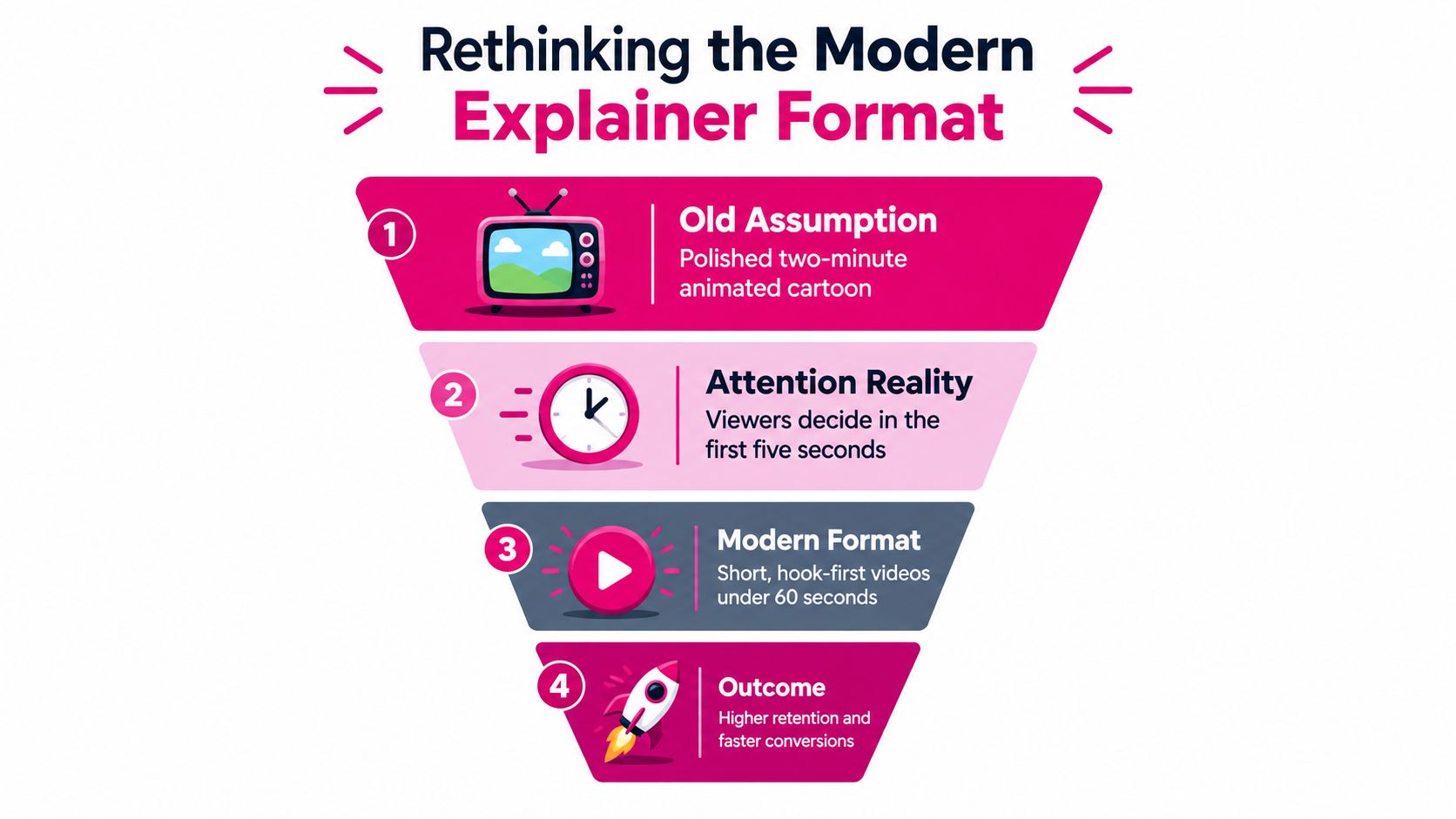
The classic format still has a place: a polished animation, one narrator, one narrative, and a final call to action. It works particularly well when the product is abstract or unfamiliar. It becomes expensive and difficult to update when the same asset must explain the product to a first-time visitor, support a buying decision, and guide an existing customer.
For an indie founder, the practical alternative is a modular video system. AI-assisted tools can speed up scripting drafts, storyboards, voice production, captions, editing, and versioning. Human judgment still owns the important decisions: the promise, proof, pacing, product accuracy, and customer context. That workflow can produce useful assets without committing to a traditional agency retainer of $15,000 for a single film.
Industry data supports video as a normal product education format. In Wifitalents' 2022 survey of marketers and consumers, 96% of consumer respondents said they had watched an explainer to learn about a product or service. The survey also reported that 68% of consumer respondents preferred video to articles or infographics when learning about new products or services, as summarized in the 2022 explainer video industry report. These findings do not justify adding video to every page. They show why a well-targeted product explanation deserves consideration.
Match the format to the funnel
A useful video system assigns each asset one job:
- Discovery clips: Show the problem, a surprising insight, or the product's clearest visual outcome. The clip should make sense without a full introduction to the company.
- Consideration explainers: Connect the problem to the product's method through a concise narrative, screen recording, or combination of animation and interface footage.
- Conversion demos: Show the exact workflow a buyer wants to verify. Once a prospect is comparing tools, broad brand storytelling often takes space away from evidence.
- Activation videos: Answer one onboarding question. A focused walkthrough is more useful than repeating the homepage pitch after signup.
Modular production keeps this system affordable. Start with a central script, then mark scenes that can stand alone. A problem scene can become a social hook, a product scene can become a feature demo, and the result can support an email or comparison page. AI makes it faster to create alternate openings, captions, aspect ratios, and voice tracks, while a human reviewer checks every version against the actual product.
The often-cited Dropbox explainer, launched in 2009, helped popularize startup-focused product storytelling. Its useful lesson is not that every founder should reproduce the same format. A clear visual explanation reduces the effort required to understand an unfamiliar product, especially when the product itself is difficult to describe in a feature list.
Stop asking one asset to do every job
A homepage video still earns its place near the main value proposition. It can explain what the product replaces, how the basic workflow operates, and what the visitor should do next. It should not also carry every feature, objection, customer segment, and integration. Those messages belong in smaller assets that can be changed without rebuilding the entire video.
Short-form assets fit modern AI-assisted workflows particularly well. 67% of AI-generated video content was reported to be under 60 seconds in the benchmark data from SundaySky's video statistics research. Shorter videos are not automatically effective, but they let a bootstrapped team test narrower messages instead of risking its full budget on one master asset.
Practical rule: Give each video one audience, one situation, and one next action. Several CTAs usually indicate that the message should be split into several videos.
A sensible first package for a bootstrapped SaaS might include one homepage explainer, several problem or feature clips, and a small set of product-specific walkthroughs. Build around customer decisions, then reuse the strongest scenes across channels. That approach keeps production manageable, preserves room for iteration, and avoids turning an explainer video into an expensive archive of features.
Scripting and Storyboarding for Retention
Viewers disengage when the script is vague, no matter how polished the animation is. If they cannot recognize the problem quickly, visual polish only makes the confusion more expensive. For a bootstrapped SaaS, that wasted production time matters because every revision competes with product work and distribution.
Write the script before choosing scenes, voices, transitions, or animation styles. Start by completing this sentence: “This video helps [specific audience] understand why [specific problem] matters and why [specific product action] is the next step.” If the sentence requires several audiences or outcomes, narrow the brief before opening an AI video tool. A focused brief produces cleaner drafts and makes later modular edits easier.
Build the first five seconds around pain
The opening should show a situation the viewer already experiences. “Businesses need better productivity” gives the audience no specific event to recognize. A founder copying customer requests between tools, a marketer waiting for a report, or an operations lead searching through scattered documents creates immediate context.
Practitioner guidance commonly recommends opening with customer pain in the first five seconds, showing the product in action, keeping homepage videos around 60 to 90 seconds, and ending with one clear CTA, as outlined in conversion-focused explainer video guidance. Treat those points as working benchmarks rather than fixed rules. A familiar product may need less setup, while an abstract technical product may require more context before the interface makes sense.
Use this sequence while writing:
- Name the friction. Show what the user is trying to do and where the current process breaks.
- Make the consequence visible. Lost time, uncertainty, repeated work, or a delayed decision gives the problem weight.
- Introduce the product as a mechanism. Explain what the tool changes in the user's process instead of calling it “powerful.”
- Prove the workflow. Display the relevant interface, output, or transformation.
- Ask for one action. Start a trial, watch a demo, connect a workspace, or read the relevant guide.
The narration should sound like a knowledgeable person explaining the product to one customer. Use short spoken sentences and remove terminology that exists mainly inside the company. If a phrase would need extra explanation during a sales call, it probably will not work in narration.
Design for sound-off viewing
Social viewers often encounter video without audio, and homepage visitors may begin with their speakers muted. Captions are part of the information architecture, not a decorative layer added during export. Production guidance also emphasizes scripting before animation, captions for sound-off viewing, and testing with view-through rate and conversion tracking, as described in Pexo's explainer video best practices.
Write narration and on-screen text together, but do not duplicate every sentence in full. The voice can explain the relationship between ideas while the screen highlights the key phrase, action, or result. Keep text large enough to read on a phone, use strong contrast, and leave it visible long enough for a distracted viewer to process.
A storyboard does not require illustration skills. A simple document or spreadsheet works well, especially when AI-generated scenes will change during review. Use these columns:
| Scene | Narration | On-screen text | Visual action | Purpose |
|---|---|---|---|---|
| Opening | The customer problem in plain language | The painful situation | Show the friction | Recognition |
| Shift | Why the old approach fails | The cost of delay or complexity | Transition from chaos to clarity | Tension |
| Product | What the product changes | One central benefit | Show the real interface or output | Understanding |
| Proof | Evidence from the workflow | A result or visible state | Zoom into the relevant action | Confidence |
| CTA | One next step | The exact button or action | Hold on the product and CTA | Conversion |
Review every scene before production. Ask whether the viewer can identify the user, problem, product action, and next step without the narrator supplying missing logic. If the answer is no, revise the script. Adding more motion rarely fixes a missing explanation.
Validate the script before rendering
Read the script aloud. Awkward phrases become obvious when spoken, and long sentences reveal where the voiceover will slow the edit. Then create a rough storyboard with screenshots, simple shapes, or hand-drawn boxes. This inexpensive pass exposes repeated ideas, unclear transitions, and scenes that would require custom work.
Use these checks:
- Message check: Can a viewer repeat the core value proposition after watching?
- Pain check: Does the opening describe a real customer situation rather than a category slogan?
- Product check: Does the viewer see what changes inside the product?
- Pacing check: Does each scene introduce new information?
- CTA check: Does the final action match the page and funnel stage?
The measurements become useful only after the script has a clear purpose. Track whether viewers stay through the opening, whether they click, and whether the target action follows. If people leave, review the hook, promise, interface proof, and CTA separately instead of treating the video as one indivisible asset.
Keep the storyboard modular. A scene that explains the product mechanism can often become a short feature clip, a sales follow-up, or a social post. Planning those reuse points during scripting lets an indie founder produce a homepage video and supporting variations without rebuilding every sequence from scratch.
Choosing Your Production Workflow and Budget
A product launch is approaching, the homepage needs a video, and the interface may change again next week. Paying an agency for a polished film can make sense for a major launch, but a traditional retainer is difficult to justify when a bootstrapped SaaS still needs room for product, support, and acquisition. The better choice depends on how quickly the product changes, how much visual proof buyers need, and how fast your team can review creative work.
A premium studio can deliver strong scripting, art direction, sound, and animation. Its weakness is flexibility. A beautiful video that becomes inaccurate after a product release has a short useful life. DIY production keeps cash costs low, but it charges you in time and often produces uneven pacing. AI-assisted production sits between those options. It can speed up drafts, voices, storyboards, captions, and alternate cuts, while a founder remains responsible for the claims and product details.
Compare the economics honestly
Published benchmarks describe different scopes. An explainer may be a template animation, custom motion graphics, live action, or a complex 3D production, so cost ranges should not be treated as interchangeable. A 2026 production benchmark places a professional 2-minute explainer between $5,000 and $20,000. It also reports that 80% of explainer videos are kept under 2 minutes, post-production can represent 30% to 50% of the total budget, motion graphics may cost $1,000 to $10,000 per minute, and complex 3D work can reach $50,000.
A separate video production benchmark puts a 60-second explainer at about $1,200 to $18,000, with timelines commonly spanning 2 to 8 weeks. Those figures are planning references, not a recommendation to buy the most expensive format. Your funnel should determine the production scope.
| Method | Estimated Cost | Timeline | Best Use Case |
|---|---|---|---|
| Traditional agency | $5,000 to $20,000 for a professional 2-minute explainer, based on the 2026 Animaker production benchmark | 2 to 8 weeks is a common broader range, according to Pexo's benchmark | A high-stakes launch, complex narrative, or brand asset requiring experienced scripting and art direction |
| DIY animation software | Tool and template costs vary by product and plan | Depends on founder availability and revision discipline | Early messaging tests, simple feature clips, and internal education |
| AI-assisted workflow | A two-minute explainer may cost about $50 to $200 in tool costs, as summarized by ContentBuck's 2026 video marketing data | The same report describes AI tools as reducing production time by 60% to 80% | Rapid experiments, modular assets, localization, and products that change frequently |
| Hybrid workflow | Combines software or AI drafts with human help for script, UI capture, editing, or sound | Often faster than fully custom work when the scope stays controlled | Bootstrapped teams that need credible output without outsourcing every decision |
Use the $5,000 to $20,000 range for custom agency work and the $50 to $200 range for AI tool costs only, excluding review and correction time. They describe different scopes, so comparing them directly can produce a misleading budget.
For many indie founders, the hybrid workflow is the practical choice. Generate several script directions, then remove weak claims yourself or with a human editor. Use AI to explore visual treatments and create alternate cuts, but capture the actual product interface when trust depends on showing a specific workflow. Pay for specialist help at the bottleneck, such as sound cleanup, motion design, or editing, rather than outsourcing every decision.
Know where AI helps and where it doesn't
AI works well for turning a product brief into a first script, generating storyboard alternatives, producing voice drafts, creating captions, translating versions, and adapting one narrative into several short clips. That matters when the goal is a modular video system rather than one permanent homepage film. A feature explanation can become a sales follow-up, onboarding clip, or social asset without rebuilding the entire production.
AI is less reliable when the video depends on precise product behavior, nuanced positioning, or complex interaction design. A generated interface may look plausible while showing an action your software does not support. A generic character can create distance from a serious B2B product. A synthetic voice may sound clean yet miss the confidence or warmth your audience expects.
ContentBuck's 2026 video marketing data says 63% of video marketers use AI tools and reports that AI-assisted workflows cut production cost by 23%. Treat those figures as reported adoption and economics, not a promise for your company. Your cost also includes review time, corrections, brand cleanup, and the consequences of publishing an inaccurate claim.
Before committing to a workflow, answer three questions:
- How often will the product change? Frequent releases favor modular scenes and editable projects.
- What must be shown exactly? UI-heavy software usually needs genuine screen footage.
- What happens if the first version underperforms? If another full production cycle is unaffordable, avoid a monolithic asset.
For founders comparing low-cost vendors and workflows, cheap video animation services can provide a starting point for reviewing available production approaches. Compare the revision process, source files, export formats, and deliverables, not just the headline price.
How Knowlify Can Help
A founder with a live product rarely needs a giant agency process first. They need a way to turn scattered docs, URLs, and rough notes into a usable video draft, then trim it down to the few scenes that directly support onboarding, launch, or support.
Knowlify is built for that kind of workflow. Its explainer video production services can turn source material into narrated, animated videos, while also supporting script generation and chat-based editing. The value is not in a long feature list. It is in getting a first cut fast, then spending time on judgment instead of blank-page work.
A practical use case looks like this. Import your help doc URL, generate a 60-second draft, replace the synthetic UI shot with a 10-second screen capture of your actual onboarding flow, then export a captioned 16:9 master and a 9:16 cut for X. That gives a bootstrapped team one core asset they can reuse across the site, product launch posts, and short-form distribution.
Use the platform when iteration is the priority
Start with one source document or page, then move through script review, scene selection, narration, captions, brand styling, and export. Keep the first version narrow. If the source covers ten features, pick the one workflow the viewer must understand and cut the rest before rendering.
Brand kits and saved templates help keep feature videos consistent when you are producing multiple assets over time. Voice options and re-voicing make it easier to adapt the same core message for different audiences without rebuilding the whole project. If the same company also needs product education or internal training, interactive calls to action, quizzes, SCORM packaging, and LMS integrations give the video a second job.
That said, the platform still asks for editorial discipline. Check each generated scene against the live product, review captions for meaning rather than spelling alone, and confirm the final CTA points to a real next step.
Use it when speed, repeatability, localization, or document-to-video conversion is the bottleneck. If your launch depends on a highly specific narrative, complex UI choreography, or a polished brand film, review the options on their site and decide whether a more bespoke studio is the better fit.
Editing and Technical Delivery Formats
A rough render is only the midpoint. Editing decides whether the viewer follows the sequence, hears the message clearly, and can watch the file without slowing the page.
Cut for comprehension first. Keep shots that add context, trim anything that repeats the narration without adding value, and hold on interface actions long enough for the viewer to register what changed. If a transition looks polished but delays the product proof, remove it. The edit should move like a product demo, not a motion reel.
Assemble the master cut
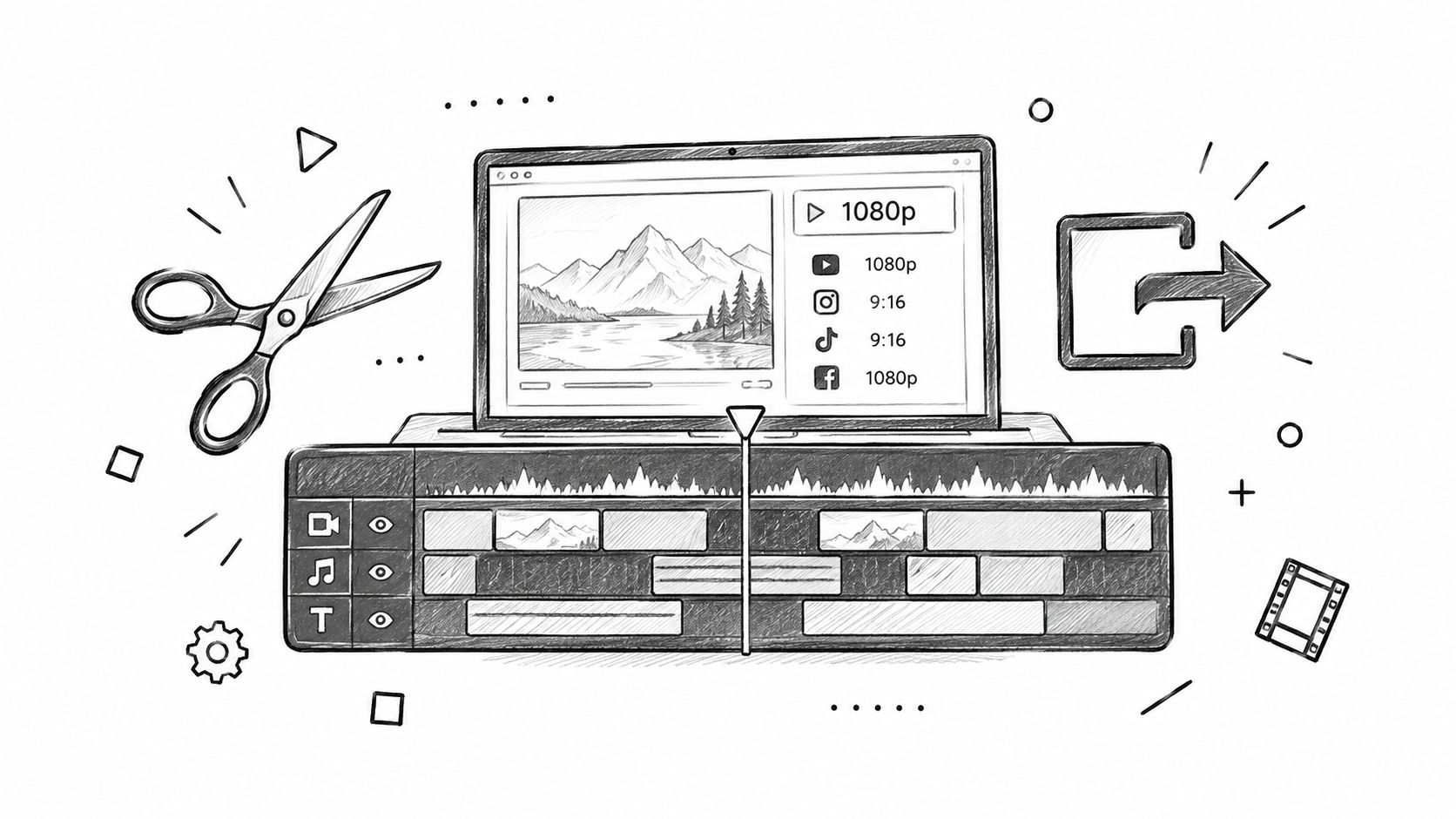
Build one clean master version first. Put the narration on the timeline, then line up visuals with the spoken logic. Do not animate the full script before hearing the voice, because a sentence that reads well on the page can feel rushed, repetitive, or too abstract once spoken.
Keep the audio mix restrained. The voice needs to stay intelligible on laptop speakers and phones, while music supports the tone without fighting the narration. Audio quality and message clarity are common failure points, and each can increase viewer drop-off when the mix competes with narration.
Captions belong in the edit workflow, not as an afterthought. Set a caption style preset for font size on mobile, contrast, and line length, then apply it across every channel cut. Correct product names and technical terms in the caption file before you burn it in for social, and use the same review pass to catch spacing or break issues that make the text hard to scan. If you want a practical reference for that step, see this captioning and transcription workflow for short-form video.
Export for the destination
One master cut can produce several delivery formats, but each version needs to fit its environment.
- Homepage hero: Use a wide composition that survives responsive layouts. Keep the file compressed, provide a poster image, and avoid autoplay with sound. The surrounding headline and CTA should still carry the point if the video has not loaded.
- Product page or sales follow-up: Show more interface detail and let the viewer pause or replay. A longer cut works when the visitor has already shown intent.
- X launch post: Lead with the product outcome in the first visual frame. Add burned-in captions and a compact aspect ratio that stays legible in the feed.
- Vertical short-form feed: Recompose the scene instead of cropping the wide master. Keep the subject, interface action, and text inside a safe central area.
- Email: Use a lightweight thumbnail or animated preview that links to the hosted video. Do not rely on an embedded player that some clients will not render.
If you are turning one master into multiple channel cuts, a tool like Blitzcut AI captions and video transcription can reduce the manual work. It will not fix a weak script, but it does speed up the repetitive part of adaptation.
Test the points where attention breaks
Name exports clearly by audience, channel, and message. Keep a master project with replaceable scenes, clean narration, music, captions, and brand assets separated into editable layers. That setup lets you swap one feature scene without rebuilding the full video.
Measure the video alongside the page, not in isolation. View-through rate shows where people stop watching. Click-through rate shows whether the next action earns interest. Engagement time shows whether viewers stay with the explanation, while conversion tracking connects the asset to signups or demo requests. A high completion rate with no action usually points to a weak CTA or a mismatch between the video promise and the page.
Avoid changing too many variables at once. Test the opening hook, the visual proof, or the CTA, then compare the result over a meaningful period. Modular editing is not about producing endless variants. It is about learning which message helps the right visitor make the next decision.
Integrating Video into Your Launch Strategy
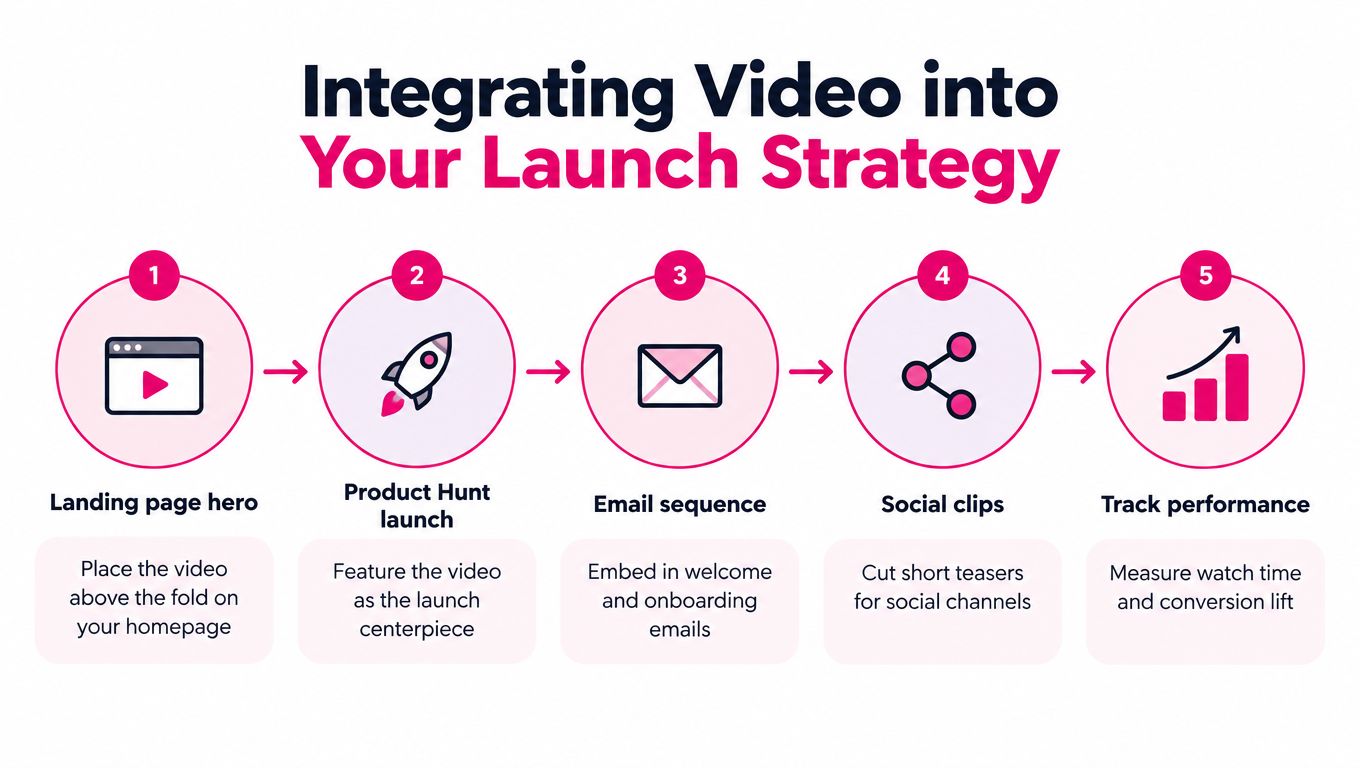
A finished video on a low-traffic page rarely carries a launch by itself. Distribution should shape production from the start, because a launch asset has to work in listings, social posts, email, community threads, and the product site without feeling copied and pasted.
Treat the master cut as the source file for a launch system. The homepage version explains the product. A short clip creates curiosity. A feature cut answers a likely objection. A silent, captioned version gives communities something easy to watch while scrolling. Each asset keeps the same positioning, but serves a different moment.
Put the strongest proof where attention starts
Your landing page should use video to answer the visitor's first question, not delay the answer behind a play button. Place a concise version near the main value proposition, support it with a written headline, and keep the CTA visible. The page should still make sense without sound and without requiring a full watch.
For a launch listing, lead with the result the product creates. A directory visitor may compare several products quickly, so the opening frame needs to identify the audience and use case. A logo animation wastes the most valuable moment. Start with the problem, the transformation, or the product in action.
Email needs the same discipline. Use a short preview in the welcome sequence, then send focused clips during onboarding when the viewer has a reason to care about a specific feature. A customer who just connected a data source needs a different explanation from a prospect who has never heard of the product.
A structured launch platform like IndieHunt's launch guide helps founders plan listing materials and distribution tasks. Use it as one channel in a broader launch plan, not as a substitute for direct customer conversations or product-led activation.
Turn one video into useful outreach
Community posts work better when the video answers a specific question. Ask for feedback on the workflow, the positioning, or the first screen. Don't ask people to “check out my startup” without telling them what to evaluate.
A practical launch package usually includes a few modular cuts:
- A homepage cut: Focused on the primary problem and product promise.
- A proof clip: Shows one real workflow, output, or before-and-after state.
- A founder explanation: Useful for communities where personal context builds trust.
- A silent social version: Captioned and understandable without audio.
- A customer question cut: Answers the objection you hear most often.
- A thumbnail set: Uses a clear outcome rather than a decorative frame.
Send the version that fits the audience. A founder community may respond to the build story and product constraints. A potential customer cares about the workflow. A launch directory needs a concise explanation that works for someone browsing quickly.
Keep the asset useful after launch day
The launch spike is only one use case. Add the video to sales follow-ups, help documentation, comparison pages, onboarding messages, and feature announcements. When a prospect asks the same question repeatedly, record or assemble a focused answer and add it to the library.
Revisit the video whenever the product's positioning, interface, pricing structure, or primary workflow changes. A stale screen creates doubt even when the product has improved. That is the trade-off for bootstrapped teams: one strong asset can keep paying off, but only if you keep trimming it into the formats people see.
Measuring ROI and Iterating on Feedback
A polished explainer can attract attention without producing signups or sales. Measure whether the right people understand the product and take the next step with less hesitation. A homepage video may aim for a signup, a sales asset for a demo request, and an onboarding clip for completion of a setup step. Give each video one clear placement and destination. That separation helps you identify whether the problem is distribution, messaging, or the product experience itself.
Connect engagement to business actions
Track the sequence from exposure to outcome instead of treating views as the result:
- Exposure: Did the intended audience encounter the video?
- Start: Did the opening frame and page placement earn a play?
- Retention: Where did viewers stop watching?
- Response: Did they click the CTA or continue into the product?
- Outcome: Did the action lead to a signup, activation event, qualified conversation, or purchase?
Pair analytics with direct customer feedback. Ask new users what they believed the product did before trying it. Review session recordings where available, and read support conversations for the words customers use when they get confused. A retention drop identifies where attention ended. Customer language often reveals why.
Keep each test narrow. If viewers leave during the opening, revise the first problem statement before changing the soundtrack or animation. If they watch through the final frame but do not click, test the CTA, the surrounding page copy, or the promise that introduces the video. If they click but fail to activate, the video may be creating curiosity without setting an accurate expectation.
AI-assisted tools can speed up this review by helping group feedback, identify repeated questions, and produce captioned or shortened versions for testing. They do not decide which customer objection matters most. That judgment still comes from product conversations and conversion behavior.
Build for product change
Avoid putting every claim into one long animation. Store the project as replaceable sections, with interface captures, voice tracks, captions, and source scripts organized separately. When a feature changes, replace the affected scene and export the relevant versions without rebuilding unrelated material.
A modular workflow also supports localization and audience adaptation. Keep the product demonstration stable while changing the narration, captions, opening pain point, or final CTA for a specific segment. Developers may care about control and integrations. Business operators may need to see the time-saving workflow first. A short, focused cut can answer each concern without forcing one video to serve every audience.
Update the asset whenever it becomes misleading. That includes an interface that no longer matches the product, a CTA pointing to an obsolete page, or a central promise that has changed. Make a smaller revision when customers repeatedly ask a question the video could answer. Leave it alone when a new feature does not affect the viewer's decision or workflow.
Measure the decision, not the decoration. A smoother transition matters only if it helps the viewer understand, trust, or act.
For an indie founder, ROI extends beyond direct conversions. A reusable master video can reduce repeated sales explanations, support onboarding, provide launch material, and expose the part of the product customers misunderstand. Those benefits become visible when the asset is connected to product behavior rather than judged by views alone. Modular cuts also make iteration practical for a team that cannot justify a traditional $15,000 agency retainer for every revision.
Start with one narrow video this week. Choose the customer question that creates the most friction, write a hook around the actual pain, show the product solving it, and end with one action. Use AI to accelerate transcription, captions, rough cut variations, and feedback sorting, then apply human judgment to the message. Produce a master cut plus a few channel-specific versions, publish them where your audience already makes decisions, and schedule a review based on retention and conversion data. Improve the scene that blocks understanding before spending budget on decoration.

Launch on IndieHunt
Submit your product to get featured in the weekly launch and reach indie founders looking for new tools.
Submit your project