


Understanding the Rise of AI Conversation Graphs
In recent years, the development of AI-driven tools has transformed the way we approach complex problem-solving. A particularly intriguing advancement is the use of conversation graphs, which allow users to branch and compare AI interactions. This trend is significant as it reflects a broader shift towards optimizing AI for more nuanced and context-sensitive applications. As AI becomes increasingly integrated into workflows across various fields, tools that can organize and manage AI interactions without losing context are becoming essential.
The Problem with Context in AI Conversations
One of the most persistent challenges in AI-driven communication is maintaining context across multiple interactions. Traditional linear chat interfaces, while useful, often fail to capture the complexity of dynamic discussions, resulting in lost information and reduced efficiency. Users, especially in research and content creation, frequently struggle with tracing back through conversation histories to extract insights or compare different AI responses. This gap highlights the need for more sophisticated tools that can visualize and manage branching dialogues effectively.
Innovative Approaches to Contextual AI Conversations
To address these challenges, developers are increasingly focusing on tools that enhance the ability to manage and visualize AI conversations. KnowTree — AI Conversation Graph for Branching Chat exemplifies this approach by offering a platform where users can create conversation graphs to branch and compare AI dialogue paths. Built for researchers, writers, and thinkers, KnowTree provides a structure for capturing the complexity of AI interactions, ensuring that no context is lost and insights are easily accessible.
Exploring KnowTree — AI Conversation Graph in Practice
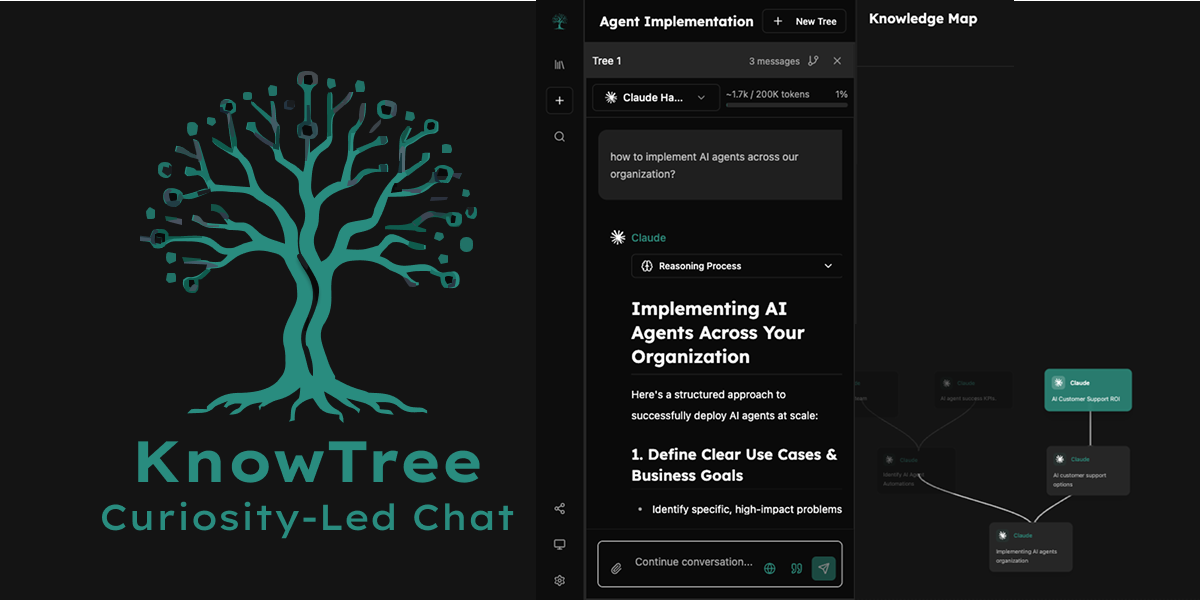
KnowTree's platform is designed to be intuitive yet powerful, catering to both individual and professional users. For instance, a researcher might use KnowTree to track and compare AI-generated hypotheses, allowing them to visualize the evolution of ideas and decisions. Similarly, a writer could use the platform to explore different narrative paths, ensuring that all creative options are considered. The platform's branching feature allows users to create a visual map of conversations, making it easier to navigate and analyze complex discussions.
Moreover, KnowTree's side-by-side model comparison feature enables users to critically evaluate different AI outputs, fostering a more informed decision-making process. This is particularly valuable in professional settings where consistency and quality are paramount. The platform's ability to scale with user needs further enhances its utility, making it a versatile tool for various applications.
What Sets KnowTree Apart
Several factors distinguish KnowTree from other AI conversation tools. Firstly, its pricing model, which is free, lowers the barrier to entry for individuals and small teams who might otherwise be deterred by cost. Additionally, KnowTree's focus on a user-friendly experience ensures that even those with limited technical skills can effectively harness its capabilities. This accessibility is crucial for democratizing the use of advanced AI tools in creative and research domains.
By enabling users to maintain context and visualize AI dialogues comprehensively, KnowTree addresses a critical gap in current AI communication tools.
Who Can Benefit from KnowTree
KnowTree is particularly relevant for users who frequently engage with AI in exploratory or evaluative contexts. Researchers, content creators, and strategic thinkers will find its features beneficial for organizing and comparing complex AI-generated content. Additionally, educational institutions and business teams seeking to leverage AI for analytical purposes could greatly benefit from its capabilities. The platform's adaptability means it can support both personal productivity and team-based projects.
About the Builder
KnowTree is the brainchild of Yoav, whose background and motivations for developing this tool are not extensively detailed. However, it is clear that the platform was created with a deep understanding of the challenges faced by users in managing AI interactions. By focusing on enhancing productivity and efficiency, Yoav aims to provide a solution that aligns with the evolving needs of researchers and professionals who rely on AI-driven insights.
The Future of AI Conversation Management
As the demand for more sophisticated AI tools grows, the ability to manage and visualize AI conversations will become increasingly important. KnowTree represents a step forward in this direction, offering a glimpse into the potential for AI to support complex decision-making processes. Looking ahead, the continued evolution of such platforms could lead to even more integrated and intelligent systems, capable of supporting a wide range of applications across different industries.
Explore the Launch
To learn more about how KnowTree — AI Conversation Graph for Branching Chat can enhance your workflow, visit the KnowTree website. The project, which recently launched on IndieHunt, can also be explored in detail on its IndieHunt project page. For creators working on similar innovations, consider submitting your project to IndieHunt to gain visibility and connect with early adopters.
KnowTree — AI Conversation Graph for Branching Chat in action
Quick Answers
What is KnowTree?
KnowTree is an AI conversation graph tool designed to help users create branching dialogues, compare AI models side-by-side, and maintain context in conversations. It is particularly useful for researchers, writers, and thinkers who need to manage complex AI interactions.
How does KnowTree enhance productivity?
By providing a visual map of AI conversations and enabling model comparisons, KnowTree helps users streamline their workflows and make more informed decisions. Its user-friendly design ensures that even those new to the platform can quickly benefit from its features.
Who should use KnowTree?
Researchers, content creators, and strategic thinkers who frequently interact with AI and need to manage complex dialogues will find KnowTree especially beneficial. It is also suitable for educational and professional teams looking to leverage AI for analytical purposes.