# YYLO CLI: AI Coding Agent Orchestration with Git-Native Workflows
[YYLO CLI](
AI agents can generate code quickly, but reliable development requires more than a prompt. Teams still need scoped work, controlled iterations, tests tied to the correct code, session continuity, and a safe path from implementation to integration. YYLO connects these steps without locking the workflow to one model provider.
## What YYLO CLI Does
YYLO supports direct agent requests, controlled coding loops, and structured task workflows. Developers can set iteration limits and combine agent steps with tests, linters, type checks, builds, or other shell commands. Inline sequences suit quick work, while YAML workflows make repeated processes reusable. Explicit session continuity helps prevent unrelated agent context from being mixed.
For configured repositories, a task can receive a dedicated exact-base Git worktree. Implementation stays isolated from protected integration state. Read-only preflight checks can detect closure problems, validation evidence can be tied to exact inputs, and clean committed work can enter a guarded merge queue.
## Key Features
- Multi-agent orchestration: Use Claude Code, Codex, Gemini, or Pi while provider credentials remain external.
- Bounded coding loops: Define iteration limits and ordered commands instead of unlimited loops.
- Reusable workflows: Combine prompts, tests, linting, builds, and scripts inline or in YAML.
- Session continuity: Continue or branch long-running agent sessions with explicit scope.
- Observable commands: Run processes with bounded logs, status checks, and terminal machine truth.
- Validation evidence: Associate content-addressed evidence with exact task inputs and committed state.
- Task worktrees: Isolate feature work from metadata and protected integration checkouts.
- Guarded Git delivery: Preserve conflicts and unrelated dirt while using expected-SHA updates.
- Developer utilities: Run diagnostics, configure model shortcuts, and install shell completion.
YYLO is written in TypeScript, distributed as @yylo/cli](yy and yylo commands support terminal use and automation.
## The Wider YYLO Ecosystem
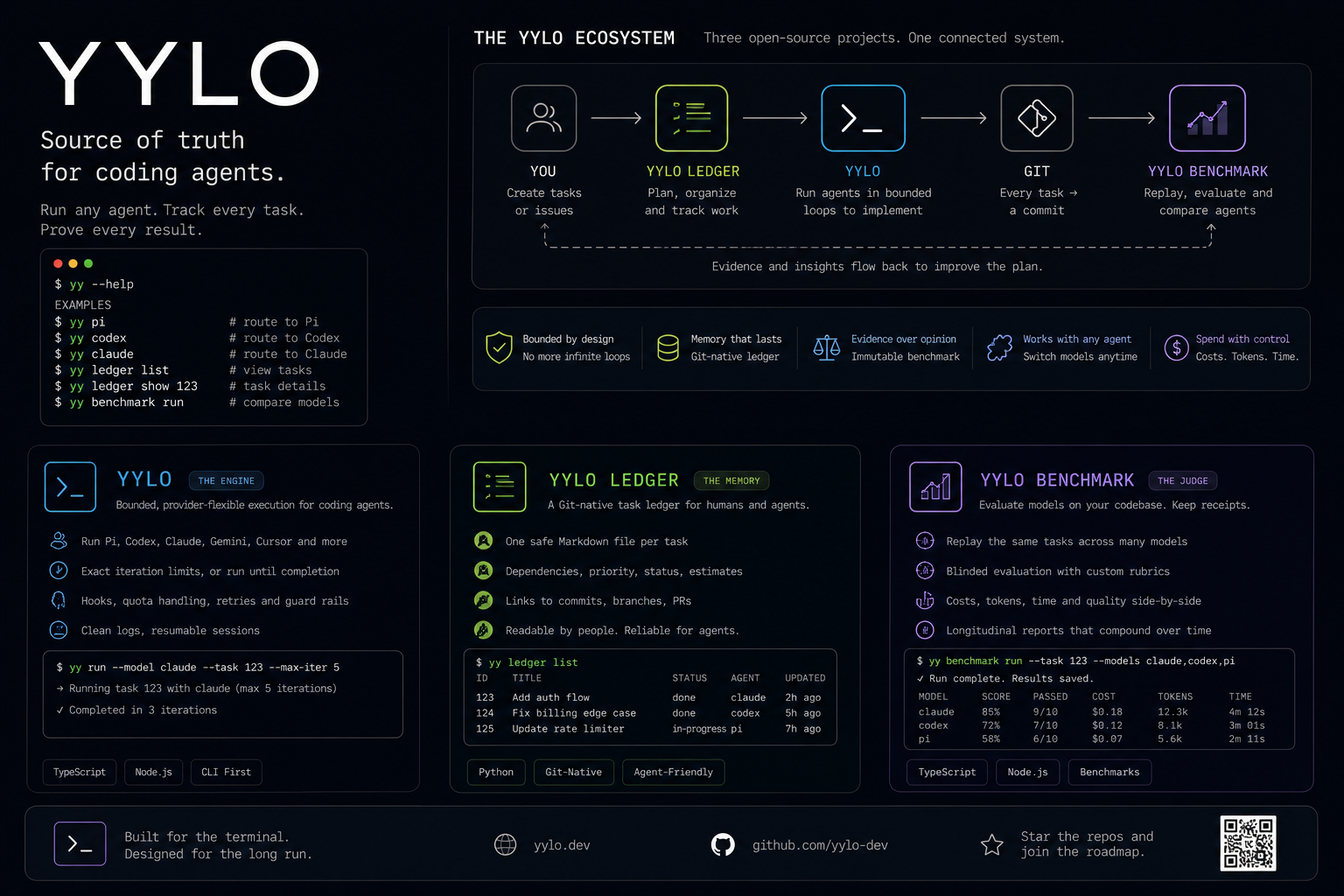
YYLO CLI focuses on execution and delivery. Two independent companion tools provide engineering memory and evaluation evidence.
[YYLO Ledger](
[YYLO Benchmark](
The products have clear roles:
- YYLO CLI orchestrates agents, workflows, validation, and delivery.
- YYLO Ledger preserves Git-native task and Record truth.
- YYLO Benchmark evaluates coding-agent attempts with retained evidence.
Teams can adopt each tool independently. Together, Ledger defines and tracks work, YYLO CLI executes it through controlled agent and Git workflows, and Benchmark supports structured comparison of results.
## Common Use Cases
YYLO CLI supports AI-assisted features, Ralph-style loops with guardrails, multi-model debugging, test-and-fix cycles, repository analysis, and long tasks. Teams needing durable task state can add Ledger, while organizations comparing agents can add Benchmark.
## A Practical AI Development Foundation
AI-generated changes are easier to trust when execution is controlled and connected to durable tasks, reproducible validation, and reviewable Git history.
[Explore YYLO CLI](
Explore more apis & integrations tools on IndieHunt.